Oznium.com Call us toll free.
866-332-6411
4.20 Shipping on every order! Oznium Cares Forum || Gallery
Search:
 Shopping Cart |   My Account |   Help
Home > Project Lighting > LED Controllers ¬

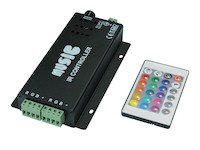
Remote 4 Channel Million Color Controller

Technical Information

Wiring Method

Common Positive

Max Output Current

2 amps per channel (8 amps total)

Wiring Diagram

Remote Control & Display Instructions

POWER
Remote display will display "P" at power OFF (stand-by). In power ON, kit will remember the last pattern used and display will show the current mode.

NORMAL
Selects normal display mode. There are 5 normal modes. Display will show "A0-A4"

GROUND
Selects 7 ground color changing. Display will show "d0-d-"

R.G.B
In color edit modes, press this key to adjust the red/blue/green color levels.

+ and -
In music modes, these buttons control the music sensitivity. Display will show "1-64".
In C7 mode, these buttons can select 7 colors. Display will show "C0-C7"
In Normal mode, these buttons adjust the flash speed. Display will show "F0-F9"
In Ground mode, these buttons choose the flash color. Display will show "C0-C6"
In Multi Flash mode, these buttons adjust the flash speed. Display will show "F0-F9"

CA
Press this key to select the 10 DIY color-changing. Display will show "b0-b9"

T/E
Tone and Edit dual-function key. If pressed quickly, it can select the 6 audio tone levels. If pressed and held for a few seconds, it will go to DIY color edit mode.

C7/CL
Selects the 7 color mode of C7 or the million color loop mode CL.

MULTI
Selects the Multi color mode. Display will show "E0-E9"

MULTI F
Selects the Multi Flash mode. Display will show "L0-L1"

MUSIC
If pressed quickly, this button will choose between the 5 music modes. Display will show "U0-U4". If held for a few seconds, this button will select between Microphone and Line-In audio music sources. Display will show "L- or P-"

PAUSE
Freezes the current pattern and colors. Press again to unfreeze. Press and hold for a few seconds to turn on the Demo mode.